There’s a lot more to MakeStaticSite than merely running a web crawler to output some web pages and then uploading that to a hosting provider. It may be properly understood in terms of workflow, whereby the tool produces output gradually, carrying out a series of distinct tasks in phases.
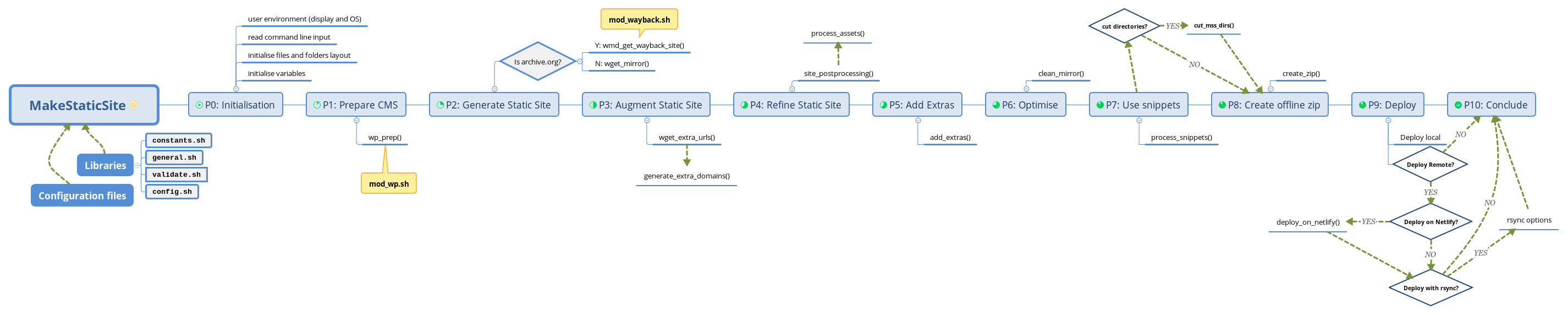
As all activity is mediated at the command line, it means that you can interweave these phases with your own shell commands and scripts, thus providing flexibility and granularity when orchestrating your static web production process.
Mind your p’s and q’s!
One of the main reasons for breaking up the process into phases is to enable finer control of the static site creation/deployment process. For example, there may be occasions when your computer has no Internet access. No problem — you can continue building the site and the static snapshot and once you are online again, you can then run ./makestaticsite.sh from a specified phase towards the end of the process. This is where we mind the p‘s and q‘s:
./makestaticsite -i config_file -p START_NUM -q END_NUM(where START_NUM is the phase where the script starts processing, and START_NUM is the phase where it stops.)
There are ten phases altogether, which we think of a pipeline.
- 0. Initialisation
- 1. Prepare the CMS
- 2. Generate static site
- 3. Augment static site
- 4. Refine static site
- 5. Add extras
- 6. Optimise
- 7. Use snippets
- 8. Create offline zip
- 9. Deploy
- 10. Conclude (summary report)
The phases be visualised in various ways:
- Download a mind map: in Xmind format (right-click and select ‘Save as’) or as a SVG file.
- Browse as a flow chart, also illustrated by a sample terminal output when building this site.

Usage Scenarios
We present a couple of scenarios to give some indication of what’s possible.
Scenario 1: Minimal processing
To generate a static site without further processing:
./makestaticsite -i config_file -q 2(where p defaults to 0)
To subsequently to deploy this site requires referring to the mirror by using another option -m that has been generated. Hence,
./makestaticsite -p 9 -m mirror_ID (where q defaults to the maximum number of phases)
Scenario 2: Interleaving
If the mirrored output from MakeStaticSite is insufficient and needs further tweaking, then you can interleave MakeStaticSite with other scripts in many different ways. For example, you could append a call to another script to deploy by some means not (yet) supported by MakeStaticSite, such as to Amazon CloudFront CDN.
MakeStaticSite supports many options, so it is preferable to use a wrapper script to define the workflow rather than manually enter a series of commands at the command line. This can be installed alongside the other scripts at the top level of the unpacked distribution. Just call makestaticsite.sh either with a dot file prefix, as above, to execute the script in a new shell context, or use the dot (or, synonymously, source) command to execute in the existing context.
- Using the dot file prefix allows the wrapper
to continue execution however the invoked script
terminates. MakeStaticSite generally exits with status
code ‘0’ for normal execution or ‘1’ when there is an
error, which supports error trapping in the wrapper
followed by some other processes.
Whilst the wrapper does not have access to variables created by MakeStaticSite, if you only want to know the path to MakeStaticSite’s output, then you might be able to determine the mirror ID from the name of the most recently created folder:
ls -Artd */ | tail -n 1 | tr -d '/'or (so many methods!)
ls -t mirror | head -n 1 | cut -f1 -d'.'- Using the dot (or source) command retains access to variables on termination of makestaticsite.sh, which can be convenient for postprocessing. However, if MakeStaticSite exits with status code other than 0, then the wrapper script will abort.
Example 2.1: Refining Output
A general use case is to further refine the static output, which can be done both during (intervention) and after running MakeStaticSite. For example, you can generate the initial Wget mirror (phase 2), possibly continuing as far as the addition of snippets (phase 7), according to your preferences. Then intervene with your own script to carry out further processing on the mirror in situ, for example, to minify JavaScript files, to run a link checker or an accessibility report. Finally, run MakeStaticSite a second time to deploy the site.
In the case of intervention, the dot (or source) command should normally be used to preserve the existing context. To illustrate, the following script initially runs MakeStaticSite to carry out most of the Wget post-processing, as far as the additional of extras. It then intervenes with a call to my_tweaks.sh for custom processing. Finally, it invokes MakeStaticSite a second time to pick up from where it left off, i.e. starting with optimisation, running HTML Tidy, and continuing until the script’s conclusion.
#!/usr/bin/env bash
source ./makestaticsite.sh -i mysite -q 5
./my_tweaks.sh -m "$mirror_archive_dir"
./makestaticsite.sh -p 6 -m "$mirror_archive_dir"
Example 2.2: Pagefind (Use Case)
A perhaps surprising and counter-intuitive interleaving of MakeStaticSite has been used to generate a Pagefind search index for Connect2Dialogue, a live WordPress site (not a static copy, like this site).
The wrapper’s code is structured in a similar way to MakeStaticSite itself, with a main() function coordinating calls to various component stages:
main() {
  initialize
  whichos
  read_config "$@"
  if [ "$working_mirror_dir" = "" ]; then
    spider_site
  fi
  build_search
  retention_refresh
  conclude
}
Here, initialize() includes a couple of libraries and defines a number of constants outside of MakeStaticSite’s functioning, i.e. to configure the parameters for Pagefind to help create a more suitable index; spider_site() calls makestaticsite.sh and then build_search() carries out the processing of output, to tailor it ahead of being processed by PageFind. The script concludes with a clean-up of old directories and finally deployment of the search index. In this case it works because the WordPress layout is directory based and doesn’t use HTML files explicitly.
See the case study for details.