Now that the development of MakeStaticSite has reached some maturity, it might be interesting and instructive to compare it with other offerings that enable websites (or portions) to be downloaded from the Wayback Machine, especially at the Internet Archive. The motivation for such functionality remains strong, both in view of the risk to Wayback Machine services themselves and for the boon of having such an archive at one’s fingertips, on one’s own computer.
To gain a proper picture, let’s delve into some of the details (an excuse for rambling on!).
Background
Most solutions that I have come across are for downloading web pages from ‘the’ Wayback Machine hosted by the Internet Archive. They generally proceed by interrogating a content index (CDX) server, which in simple terms can be regarded as the API to the back-end repository. As illustrated for Hartator’s Wayback Machine Downloader, which can be called from within MakeStaticSite, such a service returns snapshots tailored to the parameters supplied, from which the client has to assemble the pieces. In contrast, MakeStaticSite doesn’t use the CDX server, but crawls the Internet Archive’s web front end.
Hartator’s codebase has issues outstanding and was last updated four years ago. Since then, other tools have emerged, one of which is Wayback Machine Downloader JS (the same name with a space and ‘JS’ appended, which we may abbreviate as WMDjs) by WhitelightSEO. It is written in Node.js, a runtime environment for JavaScript, a technology stack that is eminently well-suited to working with websites. It’s typically distributed with NPM, which takes care of dependency management properly rather than the ad hoc rudimentary checks in MakeStaticSite, though it has few components with Wget being the main one.
Methodology
We’ll compare experiences of downloading for offline usage several small sites using the tools at the command line, aiming to get as close as we can to a snapshot at a particular point in time. The resulting files are loaded without the involvement of a web server, i.e., as file:///, so this is truly serverless.
Usually, this is not strictly possible as a Wayback site is typically build up in piecemeal fashion from very many snapshots with different timestamps. Then, what might be deemed satisfactory, what leeway is allowed, is open to discussion. Both Wayback Machine Downloader JS and MakeStaticSite support date ranges with start or end dates being optional. The seed URL (original URL with a timestamp), can be used as one of these. However, the way date ranges are operative as constraints differs, which will hopefully become evident below.
To illustrate, suppose we are interested in capturing an
archive of everything under https://example.org/about/ from
early June 2018. We go onto the Wayback Machine website and
browse the calendar view of snapshots, which, gives a
snapshot of, say, 20180604123456, i.e., 4 June 2018 at
12:34:56. This is represented as a Memento on the Wayback
machine, with a URL of
https://web.archive.org/web/20180604123456/https://example.org/about/.
Our aim is to download a faithful copy of that URL as it was at that time or close to it.
MakeStaticSite (and date ranges)
MakeStaticSite was originally developed for live sites: for a given URL , the simplest way of using MakeStaticSite is to run setup.sh with the seed URL entered directly:
$ ./setup.sh -u URLIt has since been extended to work seamlessly with Wayback URLs, which are effectively the original URL prefixed by a domain and directory path with timestamp. Hence:
$ ./setup.sh -u https://web.archive.org/web/timestamp/URLSo, for the example above:
$ ./setup.sh -u https://web.archive.org/web/20180604123456/https://example.org/about/The setup script will generate a configuration file and then proceed to run makestaticsite.sh on it, accessing files one by one from their respective snapshots as it proceeds to crawl the site using Wget’s mirroring options. It gradually and organically increments the scope of snapshots used, as it discovers fresh assets belonging to an already downloaded page.
During the first run of Wget (Phase 2) the --directory-prefix is set to the Wayback URL path, effectively limiting downloads to that exact timestamp. In subsequent runs (wget_extra_urls(), Phase 3), assuming the constant wayback_timestamp_policy=range, additional URLs are determined from the downloaded pages with the timestamp acting as a lower bound on each such URL, while there is no upper bound. In practice, the Wayback Machine will try to return the exact or closest more recent match.
For smaller sites, as here, the effects aren’t usually significant when crawled, with the earliest date often close to the latest date. However, for larger sites that have received ongoing updates, especially when crawled from the root, this generally has the effect of generating an archive that starts ‘old’ at the top of the tree and becomes successively newer as you move along its branches. In such cases, to constrain the behaviour, it is sensible to use both the earliest and latest timestamps when running MakeStaticSite, using a custom notation of separating them with a hyphen:
$ ./setup.sh -u https://web.archive.org/web/timestamp_earliest-timestamp_latest/URLMakeStaticSite will parse this extended URL syntax to extract the two timestamps and set them as earliest and latest dates, looking ‘forward’, so the seed URL used in Phase 2 will actually be https://web.archive.org/web/timestamp_earliest/URL. Then the two timestamps subsequently act as oldest and newest bounds.
Further options
The setup script can be run to interactively set a number of options and thereby refine the crawl behaviour, such as wget_extra_options — just remove the -u option. And after running once, the configuration file can be edited directly.
Wayback Machine Downloader JS
Wayback Machine Downloader JS runs generally start with the command:
$ node index.jsThey are then configured interactively; options are fewer, so customisation is simpler than for MakeStaticSite. Tests carried out generally fell into the following pattern:
$ node index.js
Enter domain or URL to archive (e.g., example.com):
URL
From timestamp (YYYYMMDDhhmmss) or leave blank: timestamp_earliest
To timestamp (YYYYMMDDhhmmss) or leave blank: timestamp_latest
Rewrite links? (yes=relative / no=as-is, default no): yes
Canonical: "keep" (default) or "remove": keep
How many download threads? (default 3): 3
Only exact URL (no wildcard /*)? (yes/no, default no): no
Target directory (leave blank for default websites//):

Download external assets? (yes/no, default no): yes
For our purposes we assume:
- Links should be rewritten as we wish to browse the site offline
- Canonical URLs are best kept, but sometimes the format is unhelpful, so if the result is broken, then this should be changed to remove.
- For a crawl, only exact URL is generally too restrictive, so the answer is usually no.
This is all that’s needed. It should proceed to determine how many snapshots are within scope and proceed to download what’s needed.
This process has to be repeated for each run.
Snapshots and Date Ranges
Setting a date range in Wayback Machine Downloader JS specifies directly the snapshots to be considered. In general, they will be considerably more numerous than for MakeStaticSite, even after filtering, and may result in outliers. So, this suggests the need for greater attention to both earliest and latest timestamps.
Ex. 1: W3C Web Accessibility Roles
The World Wide Web Consortium (W3C) has documentation on
accessibility, with a section on roles found at https://www.w3.org/WAI/roles/.
For our first example, we choose a point in time when the
Wayback Machine recorded a snapshot with a timestamp of
20250325080610, i.e., 25 March 2025 at 08:06:10, available
at:
https://web.archive.org/web/20250325080610/https://www.w3.org/WAI/roles/.
MakeStaticSite
We start by directly planting that seed URL in the setup script:
$ ./setup.sh -u https://web.archive.org/web/20250325080610/https://www.w3.org/WAI/roles/Its output looks like:

The output appears to be complete; following each of the links in the left hand menu takes you to the respective page, whilst other links take you back to web.archive.org.
The same output is generated when limiting the capture to that precise date, i.e., using as Wayback URL input: https://web.archive.org/web/20250325080610-20250325080610/https://www.w3.org/WAI/roles/. This indicates the stability of MakeStaticSite’s output — extending a date range either retains the existing output or extends it incrementally.
Wayback Machine Downloader JS
Started by running the script with open-ended end date:
$ node index.js
Enter domain or URL to archive (e.g., example.com): https://www.w3.org/WAI/roles/
From timestamp (YYYYMMDDhhmmss) or leave blank: 20250325080610
To timestamp (YYYYMMDDhhmmss) or leave blank:
Rewrite links? (yes=relative / no=as-is, default no): yes
Canonical: "keep" (default) or "remove": keep
How many download threads? (default 3): 3
Only exact URL (no wildcard /*)? (yes/no, default no): no
Target directory (leave blank for default websites/<host>/):
Download external assets? (yes/no, default no): yes
Downloading https://w3.org/WAI/roles to websites/w3.org/ from Wayback Machine archives.
Getting snapshot pages
........ found 528 snapshots to consider.

[████████████████████████████████████████] 100% (12/12)

Download completed in 37.01s, saved in websites/w3.org/ (12 files)
This resulted in:
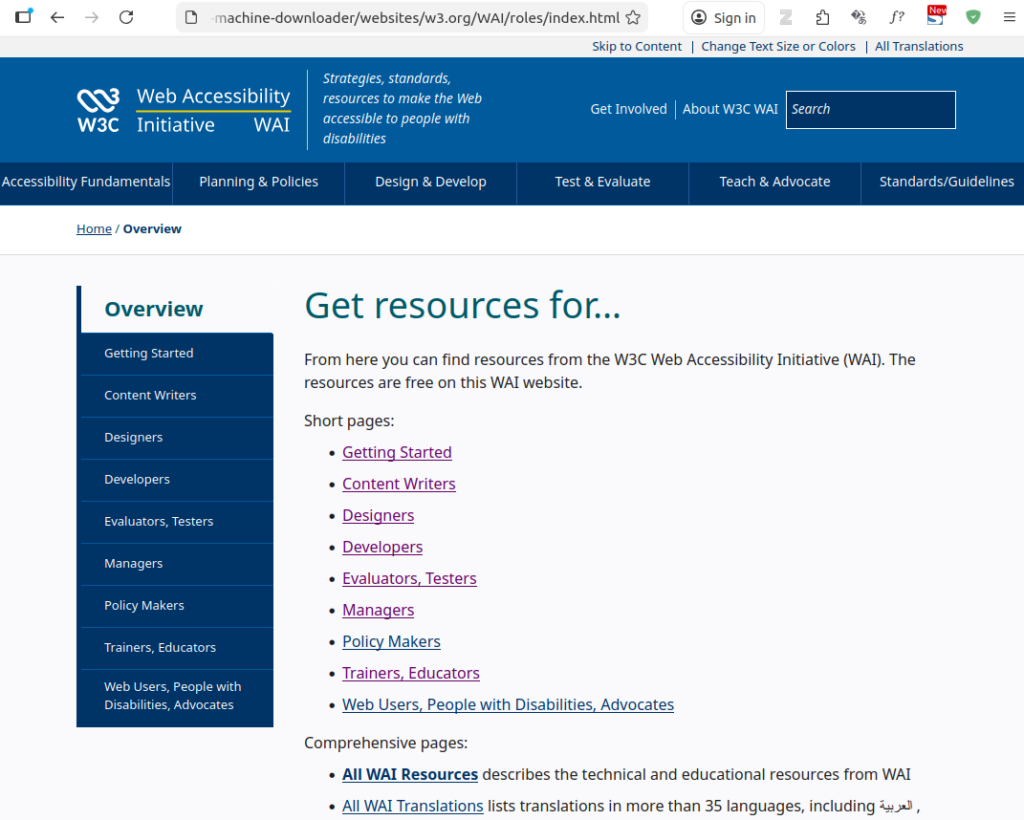
By not specifying a latest date has resulted in a more (the most?) recent snapshot being selected. In the intervening period, the only significant change appears to have been to the logo. Evidently, we can’t use the same ranges for both MakeStaticSite and Wayback Machine Downloader JS, so some variations were tried to try to get a closer match.
- Rerun with the latest date set to 20250425080610 and
the earliest date to a month before, i.e.,
20250325080610, output directory manually specified as
websites/www.w3.org_2/.
In a web browser, this returns a completely navigable site, with no immediately visible differences to the MakeStaticSite output. - Repeating the above except for not setting any earliest date (with output directory manually specified as websites/www.w3.org_3/) also yields visibly the same result.
- On the other hand, rerunning with both the earliest
and latest date set to 20250425080610 (output directory
manually specified as
websites/www.w3.org-exact/) returns the
top-level page with page requisites,
but it is not possible to navigate to the menu items (files not found and don’t appear to have been downloaded), even though there are snapshots for these pages with those timestamps. Is this by design or a bug?
File Layout
More substantive differences are in the back end, with the files and how they are laid out, even where browser behaviour may be equivalent.
For the timestamp range (single timestamp) above, MakeStaticSite created the nested folder web_archive_org20250325080610-20250325080610/www.w3.org. According to the file explorer, within that there were 57 items, with the top two levels as follows:
$ tree -L 2
.
├── designers
│   └── index.html
├── developers
│   └── index.html
├── index.html
├── managers
│   └── index.html
├── new
│   └── index.html
├── policy-makers
│   └── index.html
├── robots.txt
├── sitemap.xml
├── testers
│   └── index.html
├── trainers
│   └── index.html
├── users
│   └── index.html
├── webassets
│   └── WAI
└── writers
    └── index.html

11 directories, 12 files
By default, MakeStaticSite adopts a Wget option to cut directories, bringing what’s at the directory path up to the root. Files that lie outside this branch are brought in underneath a webassets/ directory. The same principal applies to assets from other domains.
If a URL is a pure directory path (no file extension), then there will be a directory index file, index.html by default, to launch in the browser; it’s easy to find in the file explorer rather than having to drill down. (To turn off the behaviour set the constant mss_cut_dirs=no and make sure that Wget is not supplied with its own --cut-dirs option.)
As a matter of course, it completes the output by creating a Robots file and a site map, the latter generated from the actual files list. (These are options that can be switched off.)
By comparison, WMDjs creates a layout reflecting the full path, the path varying according to the timestamps given. For example, within websites/www.w3.org_2/ we find:
$ tree -L 2
.
├── wai
│   └── roles
└── WAI
    ├── assets
    ├── feed.xml
    └── roles

5 directories, 1 file
Which of the wai/ or WAI/ folder to choose? It turns out that WAI/ is the right one, whereas the former leads to a redundant copy of a leaf page, albeit one that links back to the other branch. Immediately, we see that without context, a set of snapshots can create redundancy, which can be confusing.
For websites/www.w3.org-exact, the result turns out to be more surprising.
$ tree -L 2
.
└── WAI
    ├── assets
    ├── feed.xml
    └── roles

3 directories, 1 file
At first, this is what we’d expect: the single timestamp has removed the superfluous branch. However, inspecting that directory …
$ ls WAI/roles
index.html
$
(Neither in MakeStaticSite nor Wayback Machine Downloader are timestamps retained for individual files.)
There’s only the index page, no others, explaining the behaviour in the browser observed above.
Ex. 2: makestaticsite.sh website
That’s this site! As explained elsewhere, it starts out as a WordPress site on a local machine and then gets flattened before being deployed to Netlify. By the time it is archived on the Wayback Machine, the hard work is done.
The seed URL on the Wayback Machine was chosen to
be:
https://web.archive.org/web/20250302113223/https://makestaticsite.sh/
Not surprisingly, both MakeStaticSite and Wayback Machine Downloader JS can create generally faithful copies, but one difference was spotted. Whereas the front page animation works on the former, it doesn’t on the latter.
For a more realistic WordPress test, I took a small
counselling site that I had advised on, choosing as seed
URL
https://web.archive.org/web/20160122005549/https://www.stellatherapy.co.uk/
Whereas MakeStaticSite reproduces the site faithfully, apart from the contact form, Wayback Machine Downloader JS misses images and has broken links. WordPress’s predisposition to remote authoring and content syndication present distinct challenges, which are most easily addressed through plugins that modify its configuration. MakeStaticSite has further measures, to help ensure that it can still work reasonably well without these, but Wayback Machine Downloader JS lacks this CMS-specific knowledge.
Ex. 3: GNU Philosophy
First, a little story. A number of years ago, Richard Stallman was invited to give a talk at Oxford University. The venue organiser, whose experience was mainly with Microsoft products, didn’t know who he was and initially arranged a seminar room for maybe 30 or 40 people. He was subsequently advised that a larger auditorium would be more appropriate, particularly as many in Oxford had an interest in the philosophy behind free software. And suitable arrangements were made.
And in that vein, the third example is a set of pages on
the philosophy behind GNU software, as expressed in the
late nineties. The seed URL is:
https://web.archive.org/web/19981201044802/http://www.gnu.org/philosophy/philosophy.html
MakeStaticSite
Along the same lines as above, MakeStaticSite is run directly on the Memento:
$ ./setup.sh -u https://web.archive.org/web/19981201044802/http://www.gnu.org/philosophy/philosophy.htmlIn older websites, as here, the principal page is often named according to context, in this case, philosophy.html — the convention of directory-based URLs with implicit indexes was not yet much established. When crawling a directory like this, a key point is to note that links may be to siblings.
MakeStaticSite duly generates the page.
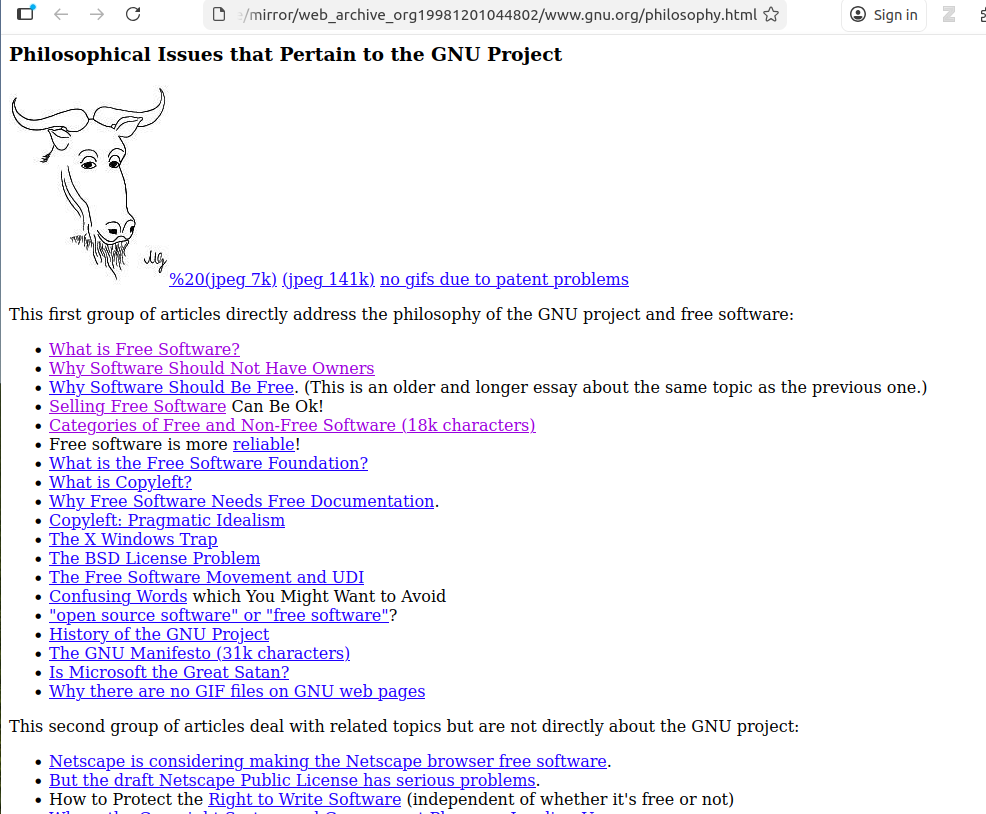
There are numerous links, so we enter the mirror directory ( web_archive_org19981201044802/www.gnu.org) and use the LinkChecker tool to automate the checking:
$ linkchecker philosophy.html
INFO linkcheck.cmdline 2026-01-25 11:43:43,143 MainThread Checking intern URLs only; use --check-extern to check extern URLs.
LinkChecker 10.2.1
Copyright (C) 2000-2016 Bastian Kleineidam, 2010-2022 LinkChecker Authors
LinkChecker comes with ABSOLUTELY NO WARRANTY!
This is free software, and you are welcome to redistribute it under certain conditions. Look at the file `LICENSE' within this distribution.
Read the documentation at https://linkchecker.github.io/linkchecker/
Write comments and bugs to https://github.com/linkchecker/linkchecker/issues

Start checking at 2026-01-25 11:43:43+001
10 threads active,     0 links queued,  316 links in 326 URLs checked, runtime 1 seconds

URL        `free-world.es.html'
Name       `Sólo el mundo Libre puede enfrentarse\na Microsoft'
Parent URL file:///home/paul/scripts/makestaticsite/mirror/web_archive_org19981201044802/www.gnu.org/philosophy.es.html, line 346, col 1
Real URL   file:///home/paul/scripts/makestaticsite/mirror/web_archive_org19981201044802/www.gnu.org/free-world.es.html
Check time 0.000 seconds
Result     Error: URLError: <urlopen error [Errno 2] No such file or directory: '/home/paul/scripts/makestaticsite/mirror/web_archive_org19981201044802/www.gnu.org/free-world.es.html'>

Statistics:
Downloaded: 729.07KB.
Content types: 4 image, 55 text, 0 video, 0 audio, 0 application, 1 mail and 518 other.
URL lengths: min=29, max=177, avg=81.

That's it. 578 links in 578 URLs checked. 0 warnings found. 1 error found.
Stopped checking at 2026-01-25 11:43:45+001 (2 seconds)
The downloaded site appears to be sound with just one file missing; a list of the files in the directory shows over 50 entries. This is confirmed by clicking on links to sibling articles in the web browser, which duly loads them and they display fine.
Wayback Machine Downloader JS
Initially Wayback Machine Downloader was run from the seed’s timestamp of 19981201044802 with the ‘to’ field left blank, involving the consideration of 10684 snapshots.
Whilst it completed, there were some reports of invalid URLs along the way and it resulted in a quite distinctive directory listing inside wayback-machine-downloader/websites/gnu.org/philosophy:
wayback-machine-downloader/websites/gnu.org/philosophy$ ls
 philosophy.bg.html   philosophy.fa.html               philosophy.html.ja
 philosophy.ca.html   philosophy.fr.html               philosophy.it.html
 philosophy.cs.html   philosophy.hr.html               philosophy.ja.html
 philosophy.da.html   philosophy.html                  philosophy.nl.html
 philosophy.de.html  'philosophy.html'$'\n'            philosophy.pl.html
 philosophy.el.html  'philosophy.htmlAcedido em: 19'   philosophy.pt-br.html
 philosophy.en.html   philosophy.html.en               philosophy.ro.html
 philosophy.es.html   philosophy.htmlhttp:             philosophy.ru.html
The strange-looking files may have been generated from document parsing errors, perhaps related to issues reported during runtime.
In sum, the philosophy.html page along with its translations constitute almost all the web pages generated; sibling pages are not available, as highlighted by link validation:
$ linkchecker philosophy.html
INFO linkcheck.cmdline 2026-01-25 12:51:17,208 MainThread Checking intern URLs only; use --check-extern to check extern URLs.
LinkChecker 10.2.1
 ...
URL        `free-sw.html'
Name       `four essential freedoms'
Parent URL file:///home/paul/dev/github/wayback-machine-downloader/wayback-machine-downloader/websites/gnu.org/philosophy/philosophy.html, line 225, col 5
Real URL   file:///home/paul/dev/github/wayback-machine-downloader/wayback-machine-downloader/websites/gnu.org/philosophy/free-sw.html
Check time 0.000 seconds
Result     Error: URLError: <urlopen error [Errno 2] No such file or directory: '/home/paul/dev/github/wayback-machine-downloader/wayback-machine-downloader/websites/gnu.org/philosophy/free-sw.html'>
 ...
Statistics:
Downloaded: 403.76KB.
Content types: 0 image, 19 text, 0 video, 0 audio, 0 application, 20 mail and 220 other.
URL lengths: min=8, max=160, avg=59.

That's it. 259 links in 259 URLs checked. 0 warnings found. 22 errors found.
Stopped checking at 2026-01-25 12:51:18+001 (1 seconds)
(have replaced 21 other pages with ellipses)
Furthermore, unlike for MakeStaticSite, only text files have been downloaded.
For the second run, the start date was kept the same, but an end date was set to the timestamp of 20001201044802. This reduced the number of snapshots for consideration to 72. This fared no better, resulting in 59 errors.
For the third run, the timestamps were retained, but the URL changed to http://www.gnu.org/philosophy/. This yielded 516 snapshots to consider and resulted in a more comprehensive download (to websites/gnu.org.2) with 68 files. However it was a mixed bag:
$ ls
 chsong@gnu.org   philosophy     'philosophy">http:'   webmasters@www.gnu.org
 graphics         philosophy.es   trad-gnu@april.org   web-translators-ja@www.gnu.org
Alongside the expected philosophy/ directory there are odd artefacts, again perhaps reflecting parsing errors, whilst a listing of the philosophy/ directory contents reveals:
$ ls
amazon.fr.html       basic-freedoms.ca.html  categories.html          dat.html
amazon.html          basic-freedoms.es.html  categories.it.html       economics_frank
amazon.ja.html       basic-freedoms.html     categories.ja.html       enviat%20mar%E7
amazon.ko.html       basic-freedoms.ru.html  categories.ru.html       fire.html
amazon-nat.html      bdk.html                category.fig             free-doc.ca.html
amazonpatent.html    bsd.es.html             category.jpg             free-doc.es.html
amazon-rms-tim.html  bsd.html                category.png             free-doc.html
amazon.ru.html       bsd.ja.html             censoring-emacs.es.html  free-doc.ru.html
apsl.es.html         bsd.ru.html             censoring-emacs.html     index.html
apsl.html            categories.es.html      censoring-emacs.ru.html
apsl.ru.html         categories.fr.html      dat.es.html
Ex. 4: WordPress site (medium complexity)
For many years, a substantial proportion of all websites have been built in WordPress, so we should have at least one example. Here, we choose a snapshot from around the time of the Covid-19 pandemic: The White Hart, until recently a centuries-old pub in the village of Wytham, near Oxford. As of writing, it is closed, the original domain appears to have been sold, and permission has been sought for change of use to residential accommodation. Being of historic significance, it should be a suitable candidate for web preservation.
We choose a snapshot from the pandemic, again a historic
period, albeit for less cheery reasons:
https://web.archive.org/web/20200706024920/http://www.whitehartwytham.com/
This is how it appeared in the browser:
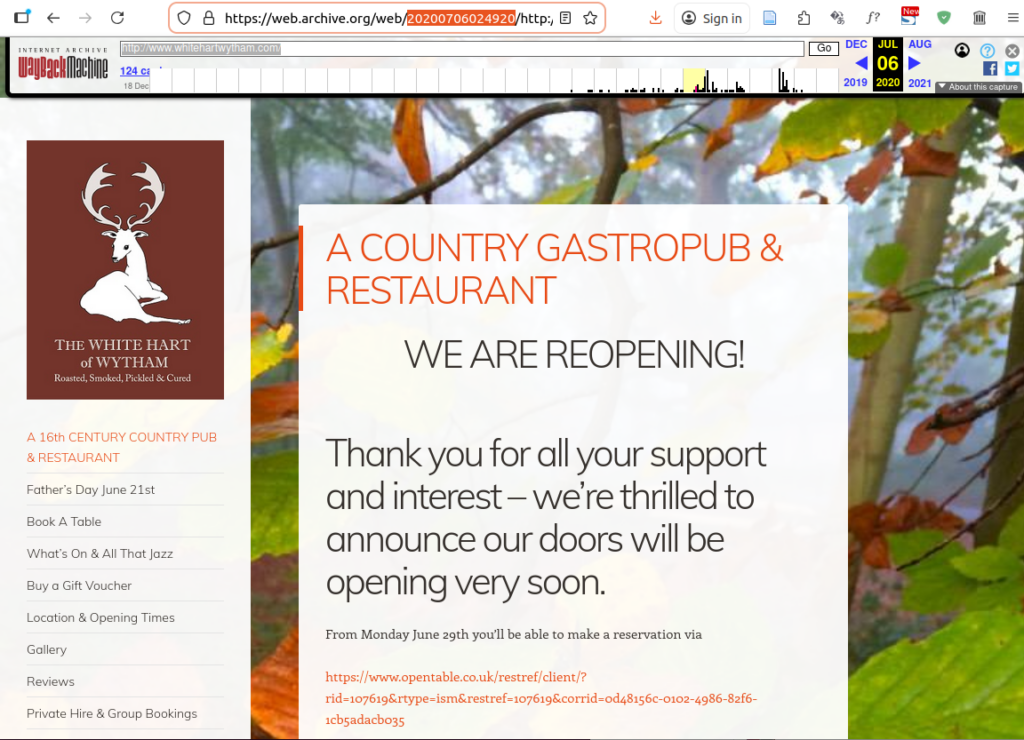
Navigation is via the left-hand menu.
MakeStaticSite
MakeStaticSite struggled with this site; the completion of its mirror took 2 hours, 48 minutes and 24 seconds. It was carried out on a modestly powered laptop, but even so such a duration is not very amenable.
When connected to the Internet, the home page appeared to load OK, but was evidently fetching files from Internet Archive. However, the real test was to use the site offline. When disconnected from the Internet (using a fresh browser), some of the CSS was clearly not being applied with ALT tags being invoked (e.g., ‘Navigation’), so those files from the Wayback Machine retrieved when online are evidently needed, but not being properly retrieved or referenced by MakeStaticSite.
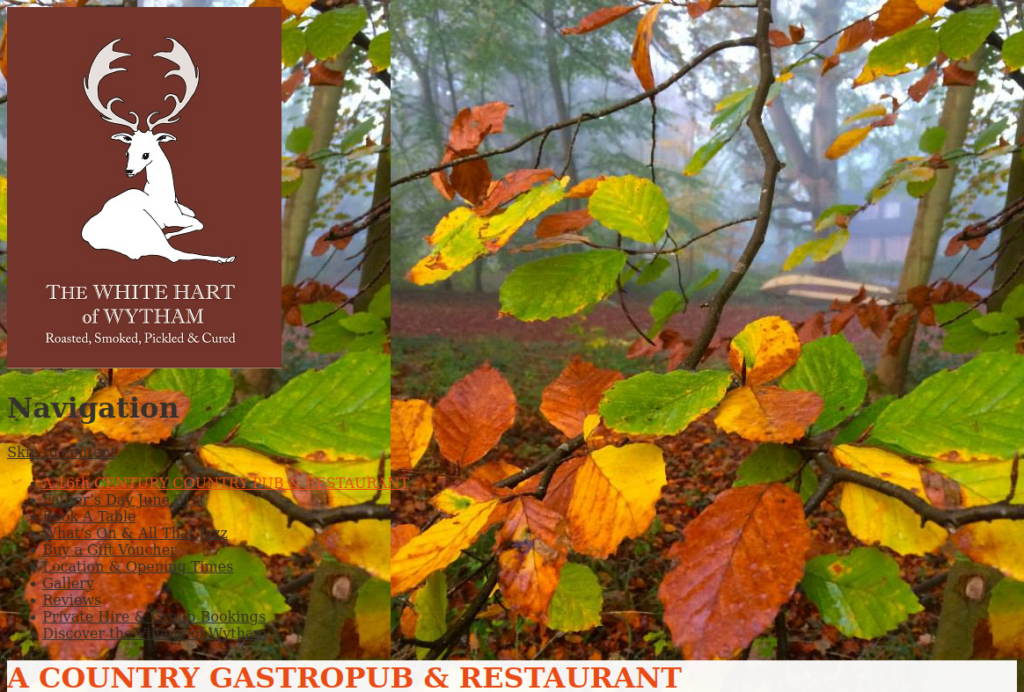
Even so, the faint internal links under ‘Navigation’ all worked, albeit the broken CSS means having to scroll down to see changes in content. On the Wayback Machine itself, these pages suffer from similar presentational issues, so MakeStaticSite’s shortcomings might be relatively minor.
Link integrity is largely maintained:
$ linkchecker index.html
...
URL        `imports/secure.gravatar.com/avatar/a700d2f63a089f5f36ab8055a4065df9%3Fs=88&d=identicon&r=g&r=g'
Parent URL file:///home/paul/scripts/makestaticsite/mirror/web_archive_org20200706024920/www.whitehartwytham.com/index.html, line 426, col 637
Real URL   file:///home/paul/scripts/makestaticsite/mirror/web_archive_org20200706024920/www.whitehartwytham.com/imports/secure.gravatar.com/avatar/a700d2f63a089f5f36ab8055a4065df9%3Fs=88%26d=identicon%26r=g%26r=g
Check time 0.000 seconds
Result     Error: URLError: <urlopen error [Errno 2] No such file or directory: '/home/paul/scripts/makestaticsite/mirror/web_archive_org20200706024920/www.whitehartwytham.com/imports/secure.gravatar.com/avatar/a700d2f63a089f5f36ab8055a4065df9?s=88&d=identic...

...

Statistics:
Downloaded: 1.48MB.
Content types: 10 image, 24 text, 0 video, 0 audio, 29 application, 0 mail and 966 other.
URL lengths: min=13, max=540, avg=127.

That's it. 1029 links in 1029 URLs checked. 0 warnings found. 6 errors found.
Stopped checking at 2026-01-26 10:27:53+001 (2 seconds)
The errors were minor, all to do with Gravatars. More significant is that the mirror actually comprised 350 files and 319 directories, suggesting that content was fragmented.
Inefficiency
One of the reasons why it takes so long, is that the Wayback Machine preserves assets at their original URL. In particular, if an image or CSS file is requested with a query string appended, it will store that asset under that URL and subsequently for a request for that asset to be successful, the URL must match exactly.
For example, on that page the following jQuery library
has been stored as a snapshot (../../imports/web.archive.org/web/20200706024934js_/https:/whitehartwytham.com/wp-includes/js/jquery/jquery.js?ver=1.12.4-wp).
However, whereas on the original site, requests to the file
without the query string (i.e. to
../../imports/whitehartwytham.com/wp-includes/js/jquery/jquery.js)
would still work, this is not so for the Wayback Machine.
The following is not in the archive:
../../imports/web.archive.org/web/20200706024934js_/https:/whitehartwytham.com/wp-includes/js/jquery/jquery.js
This leads to proliferation, both in the archive, but especially in MakeStaticSite as its rudimentary heuristic to grab anything that looks like a URL leads to it getting bogged down by many thousands of permutations, only a few of which actually lead anywhere.
By default, the constant prune_query_strings=yes, so MakeStaticSite tries to prune whatever such query strings it finds, but in the case of the Wayback Machine this might lead to gaps, as here. This needs to be reviewed.
The ideal scenario for running MakeStaticSite against WordPress sites is when there is access to the dashboard and then it’s generally recommended to use a plugin to remove such query strings before being crawled. For some sites, that’s not needed. Opposite the White Hart is Wytham Stores (https://www.wythamstores.co.uk/); MakeStaticSite can generate a faithful copy of that in under a minute. However, the Wayback Machine often struggles with WordPress; as of writing I’ve not seen the Wayback Machine achieve a reasonable copy with its 20+ snapshots.
Wayback Machine Downloader JS
Initially Wayback Machine Downloader was run with blank ‘from’ timestamp and ‘to’ timestamp set to the seed of 20200706024920.
$ node index.js
Enter domain or URL to archive (e.g., example.com): http://www.whitehartwytham.com/
From timestamp (YYYYMMDDhhmmss) or leave blank:
To timestamp (YYYYMMDDhhmmss) or leave blank: 20200706024920
Rewrite links? (yes=relative / no=as-is, default no): yes
Canonical: "keep" (default) or "remove": remove
How many download threads? (default 3): 3
Only exact URL (no wildcard /*)? (yes/no, default no): no
Target directory (leave blank for default websites//): websites/www.whitehartwytham.com.2/
Download external assets? (yes/no, default no): yes
Downloading https://whitehartwytham.com to websites/www.whitehartwytham.com.2/ from Wayback Machine archives.
Getting snapshot pages
It considered 1840 snapshots and selected 129.
In the web browser, the home page looked the same as for MakeStaticSite’s version displayed offline, missing some styling. However, there was no improvement to WMDjs version when online.
The majority of the links in the main navigation were broken. Those that did work led to pages that had minimal styling, lacking background images. Running LinkChecker on index.html in the mirror’s root directory indicated that there were in fact many more link issues; it concluded with:
Statistics:
Downloaded: 2.92MB.
Content types: 6 image, 53 text, 0 video, 0 audio, 285 application, 2 mail and 594 other.
URL lengths: min=14, max=247, avg=116.

That's it. 940 links in 940 URLs checked. 2 warnings found. 214 errors found.
Stopped checking at 2026-01-26 12:18:34+001 (2 seconds)
Many errors arose from URLs not found.
Another run was carried out with the same settings except to keep URLs canonical. This resulted in the same number of snapshots being downloaded together with an increase in the number of files in the output. In the web browser, the look and feel was generally the same, but this time all but one of the main navigation links were working.
LinkChecker gave a mixed report:
Statistics:
Downloaded: 5.56MB.
Content types: 13 image, 95 text, 0 video, 0 audio, 363 application, 4 mail and 1069 other.
URL lengths: min=8, max=453, avg=114.

That's it. 1544 links in 1544 URLs checked. 1 warning found. 390 errors found.
Stopped checking at 2026-01-26 12:32:47+001 (4 seconds)
More has been captured, but errors have increased also.
File layout
Some significant differences were evident in the file layout.
For MakeStaticSite, the top level looked like:
$ ls
about                          pod-2
book-a-table                   pod-3
buy-gift-vouchers              pod-4
christmas-2019-now-booking     privacy-button
comments                       privacy-cookies-policy
fathers-day-june-21st          private-hire
feed                           reviews
gallery                        robots.txt
gift-voucher-terms-conditions  sitemap.xml
img_1238-4                     terms
imports                        terms-and-conditions-for-website-usage
index.html                     the-village-of-wytham
location-opening-times         website-disclaimer
mailing_list_header            website-disclaimer-button
menus                          wp-comments-post.php.html
news-events                    wp-content
osd.xml                        wp-includes
our-story                      wp-json
pie-pint-night
This is what one might expect.
On the other hand, for the first Wayback Machine Downloader run, the output was:
$ ls
2014        a5nvBq-4kS                        likes                    P5nvBq-4tP
2015        a5nvBq-4kX                        location-opening-times   pie-pint-night
2017        about                             maps                     privacy-cookies-policy
2018        alfresco-argentine-bbq            media                    private-hire
2019        avatar                            menus                    ResolutionCMS
a5nvBq-4aB  book-a-table                      news-events              reviews
a5nvBq-4aI  buy-gift-vouchers                 newsletter-mailing-list  robots.txt
a5nvBq-4an  christmas-2019-now-booking        new-years-eve-2          s
a5nvBq-4aX  christmas-parties                 oembed                   _static
a5nvBq-4aZ  comment-page-1                    osd.xml                  static.tacdn.com
a5nvBq-4b2  comments                          our-story                terms-and-conditions-for-website-usage
a5nvBq-4b9  css                               P5nvBq-1                 the-village-of-wytham
a5nvBq-4bg  cultivate-shop-at-the-white-hart  P5nvBq-1H                valentines-day
a5nvBq-4bP  dining-club                       P5nvBq-1W                valentines-day-2
a5nvBq-4bq  favicon.ico                       P5nvBq-1Y                valentines-eve-dinner-february-14th
a5nvBq-4bS  feed                              P5nvBq-1z                vegan-menu
a5nvBq-4bV  fine-dining-at-fair-prices        P5nvBq-3G                website-disclaimer
a5nvBq-4bY  gallery                           P5nvBq-3K                whitehartwytham.com
a5nvBq-4c2  getting-here-backplaces-to-stay   P5nvBq-3M                wpcom-block-editor
a5nvBq-4cF  gift-voucher-terms-conditions     P5nvBq-3T                wp-content
a5nvBq-4cj  history                           P5nvBq-3u                wp-includes
a5nvBq-4cl  i                                 P5nvBq-3V                wp-json
a5nvBq-4ct  img                               P5nvBq-46j               wytham-tuesday
a5nvBq-4cv  index.html                        P5nvBq-48b               xfn
a5nvBq-4k7  jetpack-comment                   P5nvBq-4Bi               xmlrpc.php
a5nvBq-4kR  js                                P5nvBq-4BN
(Files generally have extensions, the rest are directories.)
The directories with prefixes a5nvBq-4 and P5nvBq are generally empty. They appear to be artefacts generated during runtime, but not cleared. Filtering them out still leaves some anomalies; some of these directories should probably be inside others.
The same issues affected the second run.
For some curious reason, the files downloaded have depended upon their file names alphabetically preceding the index file; it seems very unlikely that they were authored outside the timestamp range.
Ex. 5: Internet Archive Blog (WordPress)
The previous example illustrated the kinds of problems that may be encountered with modern WordPress sites. It’s partly due to the CMS architecture with a strong emphasis on communication flows between various Internet services that go beyond the original design.
In this example, we choose a more traditional use of WordPress as a blog courtesy of the Internet Archive! To keep things relatively simple, the URL in question is https://blog.archive.org/about/, but on browsing the Wayback Machine archive, it seems there are few instances where it displays reasonably well.
One of these that does is
https://web.archive.org/web/20251209023821/https://blog.archive.org/about/,
which at least appears fine in Firefox (Linux):
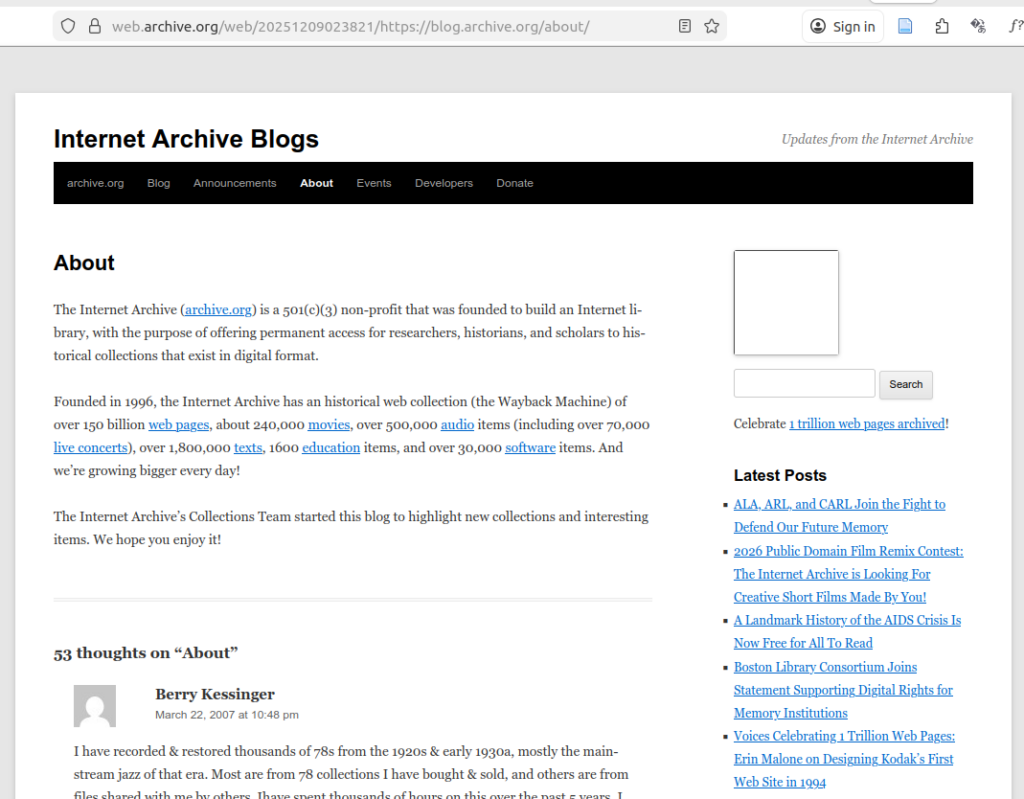
(But loading the same URL in Opera resulted in a degraded experience.)
MakeStaticSite
The output was generated as follows:
$ ./setup.sh -u https://web.archive.org/web/20251209023821/https://blog.archive.org/about/It completed in just under 20 minutes and used 4 snapshots, all with the timestamp of Tue 9 Dec 02:38:21 GMT 2025: web page plus page requisites, including CSS, JavaScript and images.
Loading the page in a browser offline displayed:
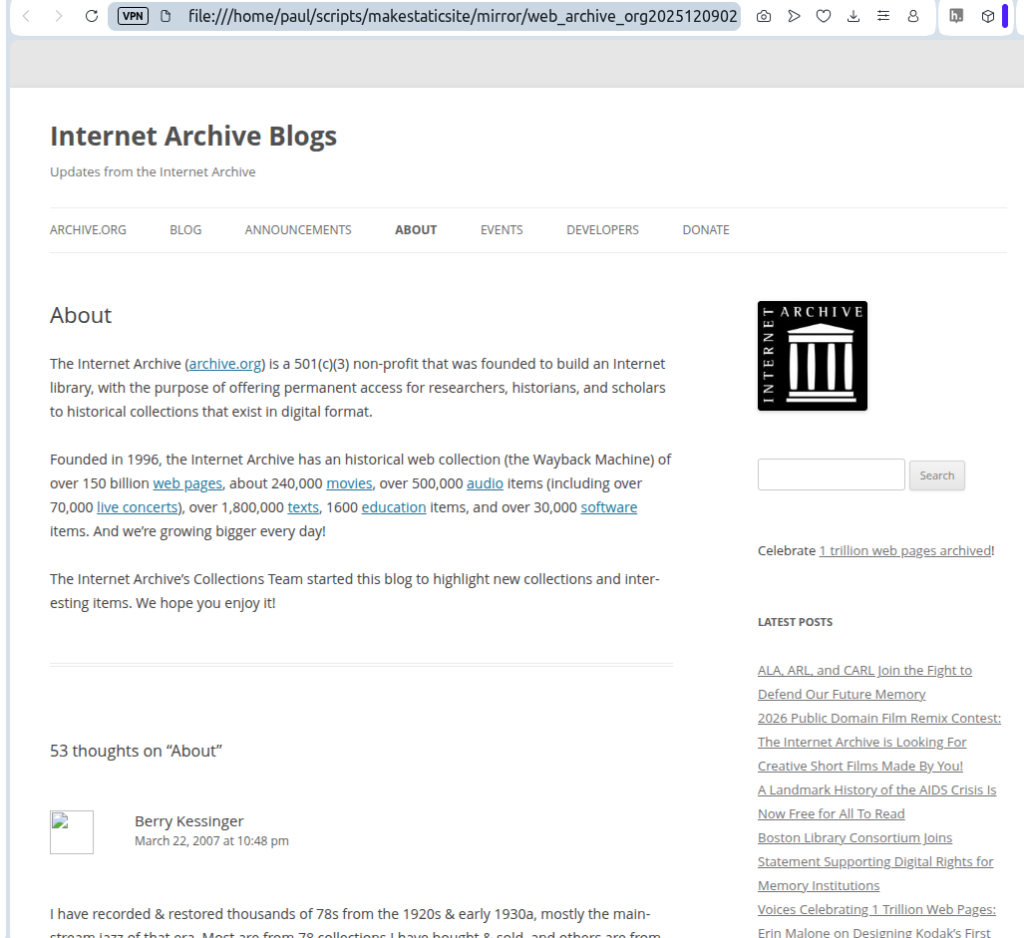
The gravatar images are sourced from an external server and so they do not display. Once online, they duly appear.
The main visible differences are the main navigation bar lacking some black on white styling, but also the inclusion of the Internet Archive logo. MakeStaticSite has deduced that image from its reading of snapshots.
Wayback Machine Downloader JS
The WMDJS download was created in the usual fashion for https://blog.archive.org/about/,
$ node index.js
Enter domain or URL to archive (e.g., example.com): https://blog.archive.org/about/
From timestamp (YYYYMMDDhhmmss) or leave blank:
To timestamp (YYYYMMDDhhmmss) or leave blank: 20251209023821
Rewrite links? (yes=relative / no=as-is, default no): yes
Canonical: "keep" (default) or "remove": keep
How many download threads? (default 3): 3
Only exact URL (no wildcard /*)? (yes/no, default no): no
Target directory (leave blank for default websites/<host>/):
Download external assets? (yes/no, default no): yes
Downloading https://blog.archive.org/about to websites/blog.archive.org/ from Wayback Machine archives.
Getting snapshot pages
........ found 10012 snapshots to consider.

[████████████████████████████████████████] 100% (27/27)

Download completed in 173.06s, saved in websites/blog.archive.org/ (27 files)
When loaded offline in the browser, it displayed as follows:
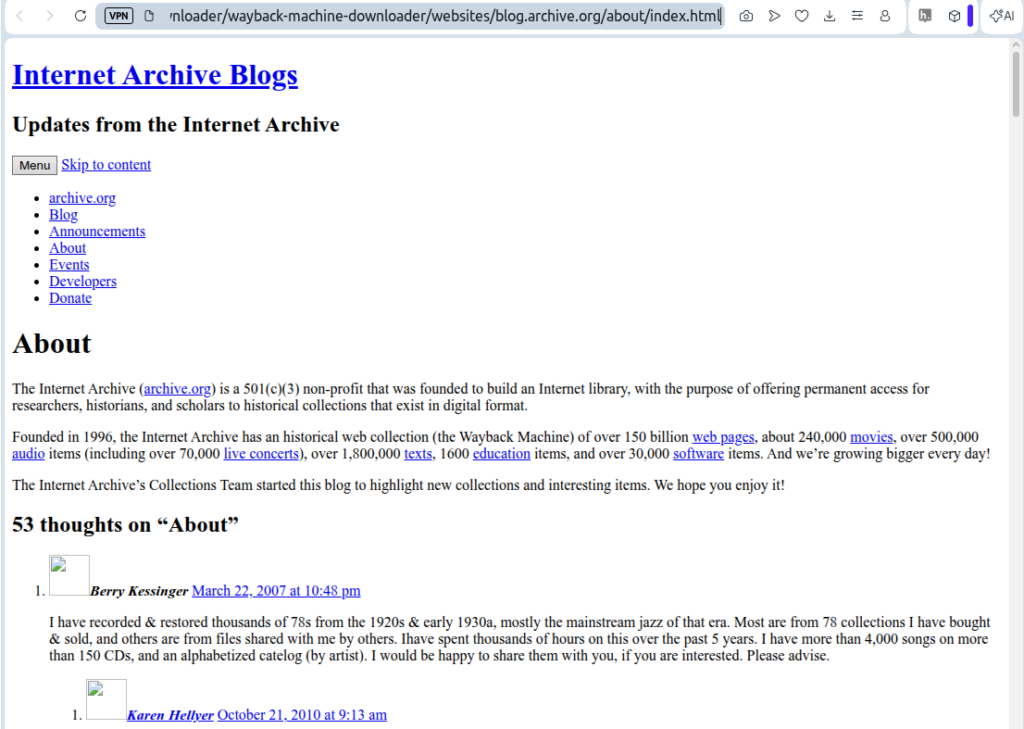
The text is preserved, but it lacks any styling or images.
There are also issues with the file layout – the about/ folder contains numerous artefacts, including oddly named empty directories, as already encountered in other examples.
MakeStaticSite is more faithful to the original and the output is cleaner.
Evaluation
MakeStaticSite and Wayback Machine Downloader JS offer distinct approaches to the problem of downloading a copy of a website (or part) from the Wayback Machine. They are both useful free tools that offer a means to recreate some of the original experience, but the mileage varies considerably.
Wayback Machine Downloader JS
Based on the tests carried out, the main strengths of Wayback Machine Downloader JS are:
- Once installed, it is a relatively simple tool to use; there are few configuration options and the interactive command-line interface is straightforward.
- It is generally much more efficient, able to directly query the snapshot repository according to date ranges and to retrieve the snapshots accordingly.
- As a result, it consumes less bandwidth and is generally much faster. It’s thus a candidate for downloading medium-sized sites, possibly larger.
- The web pages that are output are generally little processed, so they are close to the original.
The main weaknesses are:
- The output is usually incomplete, with some broken navigation.
- It’s not easy to determine exactly which snapshots (and corresponding date ranges) are needed to deliver a coherent site, an issue that affects all tools that use the CDX server in this way. It is this lack of contextual information that makes it difficult to avoid missing files and broken links.
- Since the output is standalone, when a link does not exist, there is no Memento in its place to point back to the Wayback Machine’s website; the link is truly broken, with no onward navigation.
- Fetching sufficient snapshots to ensure site coherence usually means downloading redundant files, resulting in untidy file layouts.
- The layout preserves original file paths. When capturing a deeply nested part, it means having to drill down to find the index page.
The Wayback Machine on Internet Archive has access to all the snapshots in WARC files and delivers them at speed, but an individual user trying to independently retrieve a site with all its components doesn’t have that luxury.
Overall, the output of Wayback Machine Downloader JS was found to be variable and usually requiring further work to make it more complete. However, it’s quick to install and get up and running.
MakeStaticSite
The main strengths of MakeStaticSite are:
- MakeStaticSite can be (and was) run as a single command, entering the Wayback Machine seed URL directly in its Memento form. This makes it very simple to use.
- The output of MakeStaticSite was found to be fairly complete and faithful to the original, reflecting the extensive mirroring capability of Wget, on which it is based.
- The output is generally neat and tidy and by default provides the convenience of cut directories, so its easy to find the top-level index page.
- In terms of snapshots, MakeStaticSite is efficient; it generally uses only a small fraction. It achieves this through a ‘just in time’ approach, extending the snapshots only according to what it finds in its ongoing analysis of the crawl outputs (runs of Wget). It does not suffer from the problem of determining ‘Which snapshots do I need?’ as it piggybacks off the Wayback Machine website, which appears to have random access to every snapshot, as it needs. The main task then becomes ensuring that the crawl is deep and extensive enough to do this completely.
The main weakness of MakeStaticSite is slow performance – it can take hours, even for sites that are fairly small, whereas Wayback Machine Downloader takes just a few minutes. There are several contributory factors:
- Dependence on the Wayback Machine web front end means competing with a huge number of other users for limited bandwidth. Mindful of this, MakeStaticSite voluntarily throttles the rate at which it downloads requests, but, depending on traffic, the Wayback Machine may limit it further.
- Whereas the initial run of Wget is straightforward, subsequent runs need to determine further URLs. MakeStaticSite tries to be very thorough, but the process is processor-intensive and the amount of time taken climbs exponentially.
- The determination of extra URLs It can result in many thousands of candidates to pass on to Wget, many of which are not available. Furthermore, many of those that are available are not returned immediately, but only after HTTP redirect.
- MakeStaticSite carries out intensive postprocessing, adding further processing time.
N.B. As the author of MakeStaticSite, this opinion may be naturally biased!
Overall, MakeStaticSite can generate fairly good replicas of original sites that are small. However, owing to relatively poor performance it’s unlikely to be practical for medium and large sites without custom configuration to constrain candidate URLs.
Comparison
The difference in approaches makes comparison particularly interesting; even though timestamp ranges are unlikely to be matched exactly, a brief review of what snapshots are available on Internet Archive can help establish respective dates for a common period in a site’s development. In general, for small amounts of content, a quick method for making a fairly close comparison starting at a given URL and Wayback timestamp (seed) is to run MakeStaticSite with the Memento for that seed and to run Wayback Machine Downloader with the ‘from’ timestamp empty and the ‘to’ timestamp set to the seed.
Both tools support ‘from’ and ‘to’ dates, but they are used differently. Generally, for MakeStaticSite, only the ‘from’ data is needed as it will follow the unfolding of a site as it encounters it on the Wayback Machine. Owing to the general nature of web development, crawling inwards generally advances in time, but the presence of existing files (downloaded first) is often adequate as a limiting factor in this unfolding and the usage of snapshots is quite parsimonious as a result.
On the other hand, not setting both ‘from’ and ‘to’ dates means that the Wayback Machine Downloader JS will download a larger number of snapshots; if the ‘to’ date is not set, then the prioritisation is generally given to more recent snapshots, not what was originally intended. So, an ‘end’ date is needed. Not setting a ‘from’ date suffers from potentially numerous superseded pages, accumulated over time. Then the problem arises: Which of these to choose? The CDX server provides filters that, for example, remove duplicates through collapsing, but it’s not known by this author if it can help much further with prioritisation. How to reproduce in this offline context something along the lines of the extraordinary realtime retrieval of any other snapshot that is available to the Wayback Machine’s front end?
It’s a difficult problem to sew it all together for the given snapshot plus or minus — and to avoid directories and files that are not relevant to the site, but it probably requires some kind of iterative process that parses the snapshots and generates further CDX API calls. The absence of such a process probably explains why with Wayback Machine Downloader JS there are often missing pages, images, and so on. In contrast, MakeStaticSite doesn’t need to concern itself with this problem; it rides on the back of the Wayback Machine front end, letting it determine which snapshots are needed for each and every link. Hence, in the small test sample, the output from MakeStaticSite was found to be generally more coherent and complete. It also has a ‘graceful’ exit for anchored assets that are not downloaded; their original links to the Wayback Machine are retained, rather than leading nowhere (to error 404: file not found).
From a user’s perspective, both tools are free and they work in a complementary fashion, so it’s useful to have them both to hand, especially when either the web interface or the CDX server is unavailable. However, whereas Wayback Machine Downloader JS is tied to the Internet Archive service, MakeStaticSite supports Wayback Machines in general and lives sites.
Conclusions
Whilst the reach of the Internet Archive is impressive, in many, if not most, cases it has only preserved a partial copy, usually spread across numerous timestamps. It’s not generally possible to retrieve from the Wayback Machine an exact copy of a website at a particular moment. Owing to the nature of snapshots, even a small site is typically assembled from a number of snapshots that are spread out over time, with no precise formula for what and when. And sometimes the assembly is poor, as already noted for Wytham Stores (https://www.wythamstores.co.uk/), even though the Wayback Machine has 27 snapshots of the home page.
Such factors typically make any web time machine more impressionistic than realistic and explains a significant part of the shortcomings in the two downloader tools; downloading and making a ‘copy’ has a sense of fuzziness and what is satisfactory depends on context. This affects comparisons of MakeStaticSite with Wayback Machine Downloader JS and indeed any tool that uses the CDX server to retrieve snapshots.
However, we can state that there are two main functional differences. The first concerns the treatment of timestamp ranges. MakeStaticSite uses the first timestamp as a baseline seed, so that page will generally look quite as it was at that point in time. The other pages will generally appear as more advanced in time. On the other hand, Wayback Machine Downloader JS tends to the most recent match in a range (if no upper bound is specified then it returns the latest match). The second difference is MakeStaticSite’s ability to organically acquire only what’s needed in the way of snapshots files. It leads to more complete coverage.
Taking all this into account, MakeStaticSite generally yields better quality output: it’s more complete and its look and feel bears a closer resemblance to the original, but it takes a lot longer to get there. A further benefit is that MakeStaticSite provides the option to retain original Wayback links where local equivalents were not generated, retaining online navigation.
For Wayback Machine Downloader JS and similar tools to progress requires additional processing to improve ‘site coherence’, basically to stitch everything together so that stylesheets work offline, external assets are properly included, and broken links are fixed — what is referred to in Wget as page requisites. In broad terms, it should take account of links in every page, determine what snapshots apply, download them and repeat the process on any new files. As with MakeStaticSite’s processing to generate extra candidate URLs for Wget, it may be a challenge to do this efficiently.
In its early days, MakeStaticSite’s only support for the Wayback Machine was by leveraging Hartator’s Wayback Machine Downloader, which it subsequently refined (from phase 4 onwards). Wayback Machine Downloader JS might similarly be incorporated. This is probably more realistic than somehow combining outputs from both.
— Paul